Perform Recovery Operations using the Power Button
Network administrators can perform recovery operations using the power button on the front panel of the RXV200.
Besides this recovery option, Android devices also feature an independent, automatic problem detection and recovery attempt capability that can culminate in recovery mode or in switching image slots.
The following figure shows the power button.
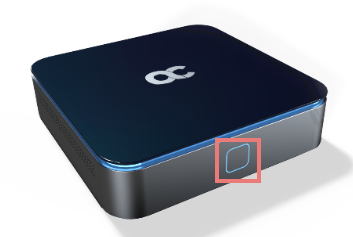
| ➢ | To perform recovery operations: |
| 1. | Disconnect the power cord from the RXV200 while long pressing the power button shown in the preceding figure. |
| 2. | Reconnect the power cord and continue pressing the power button, as described in the following table. |
|
Press button |
Action |
Press button for |
LED indication after releasing the button |
|---|---|---|---|
|
On Uboot |
Nothing |
<= 4 seconds |
|
|
ENTER_RECOVERY |
4 ~ 6 seconds |
Red |
|
|
SWITCH_AB_SLOT |
6 ~ 8 seconds |
Green |
|
|
ENTER_LOADER |
8 ~ 10 seconds |
Blue |
|
|
RESTORE_DEFAULTS |
>= 10 seconds |
Yellow |
| 3. | In the recovery menu use the power button to navigate between menus in the recovery mode. Long-pressing the button selects the highlighted option. |
| 4. | Reconnect the power cord and continue pressing the power button for however long is necessary. |
| 5. | In the recovery menu use the power button to navigate between menus in the recovery mode. A long press selects the highlighted option. |